

Usage
Charges page (administrator)
Section titled “Charges page (administrator)”Vendors > Label & service charges lists every charge: shipping labels, monthly service fees, manual charges and credits, and refunds. The cards at the top show what was posted to vendor balances, what waits for the next run and how many charges need review.
| Status | Meaning |
|---|---|
| Needs review | No price was found, or “Review first” is on. Set the amount and approve, or void it. Not in the vendor balance. |
| To be posted | Approved; the next run posts it. |
| Posted | In the vendor balance as one transaction on Vendors > Accounting, with the label reference, the order and the marker [VLC-<id>]. |
| Void | Cancelled or rejected before posting; it never reached the balance. |
Each label row shows the carrier, service, weight, tracking number, order and, for administrators, the marketplace cost and where it came from (carrier price, price table, default price, set by hand).
- Approve / Void: tick charges that are not posted yet and use the buttons under the list.
- Edit: a charge that needs review can be changed (amount, description) and approved in one step.
- Refund to the vendor: on a posted charge (tools menu). It adds a refund row and a credit transaction; the original transaction is never edited.
- Manual charge or credit: the form in the right column posts a charge (vendor pays) or a credit (vendor receives) with your description at once.
- Run now: scans the sources, refunds cancelled labels, records the month’s fees and posts.
- Export CSV: the rows of the current search, with cost and markup.
Cancelled labels
Section titled “Cancelled labels”When a label is cancelled in its label add-on, the charge is voided (if it was not posted) or refunded to the vendor balance (if it was). When the label add-on deletes a charged label row (some do that with a deleted order, while the carrier still bills the label), nothing is refunded automatically: the charge gets the badge “Label row removed: check” and the card “Label rows removed”; filter them with “Label row removed in the label add-on” and use Refund to the vendor (posted) or Void (not posted) when the carrier voided the label. Sendcloud reports a cancellation at once; when Sendcloud queues it, or for other label add-ons, the next run finds the cancelled label (for 90 days after the label date).
Monthly summary and margin
Section titled “Monthly summary and margin”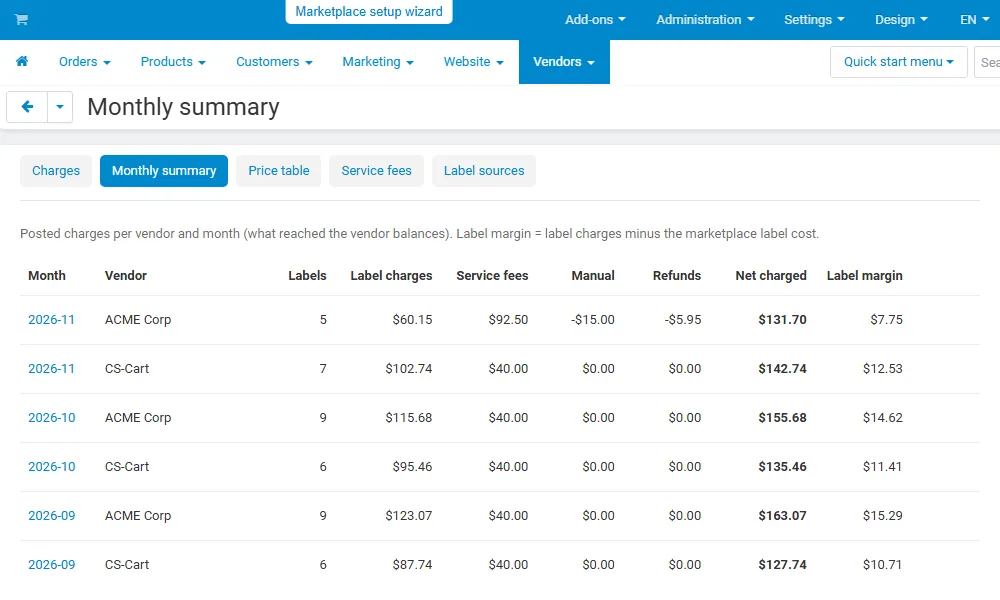
Monthly summary shows per vendor and month: labels, label charges, service fees, manual charges, refunds and the net amount charged, plus the label margin (label charges minus the marketplace label cost). Export it as CSV.
Vendor panel
Section titled “Vendor panel”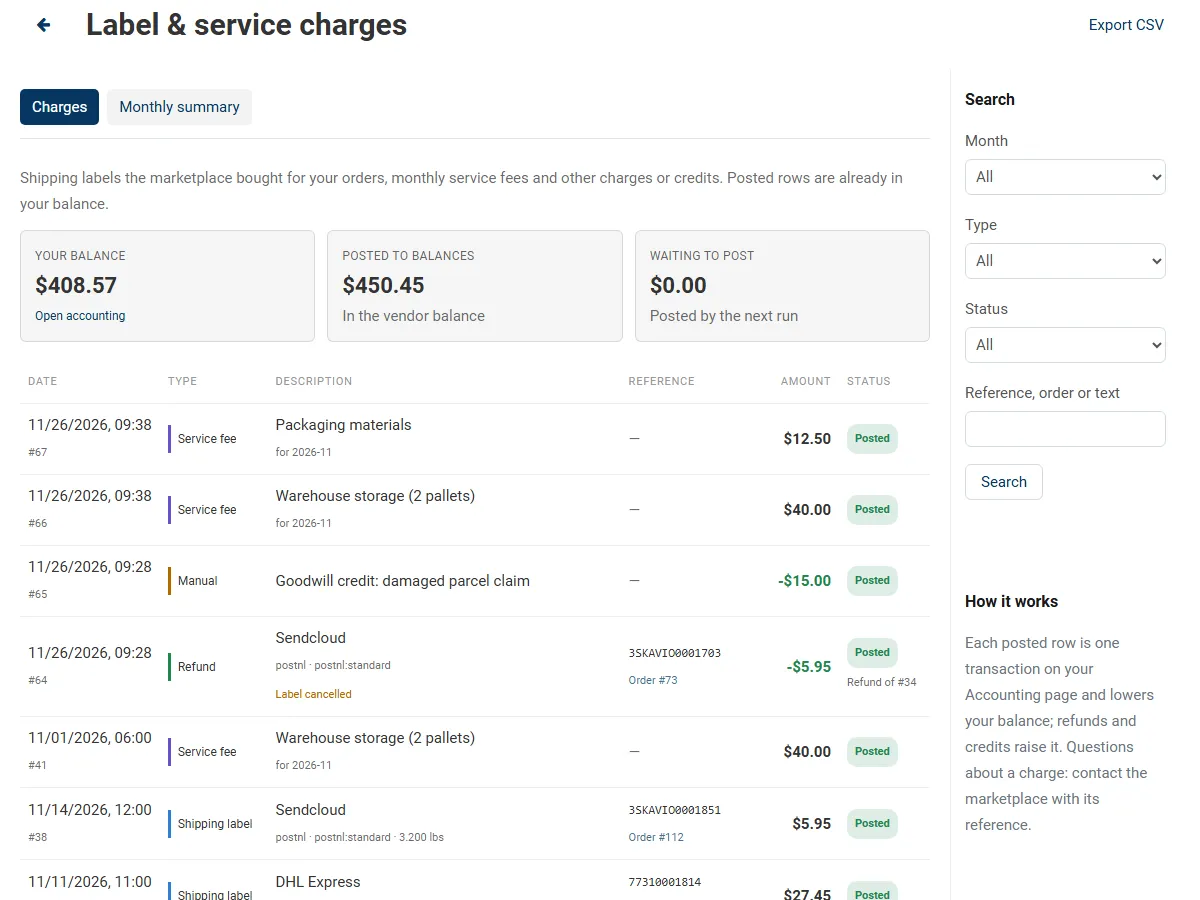
Vendors open Vendors > Label & service charges (or Seller tools with the vendor panel configurator) and see:
- their current balance and a link to their Accounting page;
- their own charges with the label reference and order, the status and refunds;
- the monthly summary;
- a CSV export of their rows (without your cost and markup).
Vendors cannot change, approve or refund anything.
Do not edit our transactions in Accounting
Section titled “Do not edit our transactions in Accounting”Each posted charge is one transaction on Vendors > Accounting with the marker [VLC-<id>]. Do not decline, edit or delete those transactions there: use Refund to the vendor on the Charges page instead, so the ledger and the vendor balance stay in sync.
Payouts
Section titled “Payouts”Posted charges lower the vendor balance like plan fees do, so the core payout flow and our Vendor Payouts Automation pay out the balance after charges. With the core Vendor debt payout add-on, a balance that goes below zero follows its rules (grace period, suspension); set your markup and fees with that in mind.