

Configuration
Settings (Add-ons > Manage > Vendor Shipping Label & Service Charges)
Section titled “Settings (Add-ons > Manage > Vendor Shipping Label & Service Charges)”| Setting | What it does |
|---|---|
| Charge vendors | Off: no new label or fee charges are recorded or posted. Pages, reports and exports keep working. |
| Label charges | Post at once (default): a priced label charge reaches the vendor balance with the next run. Review first: every label charge waits on the Charges page until you approve it. A label without a price always waits for review. |
| Markup on labels, % | Added to the marketplace cost of every label. 0 = charge the cost only. |
| Handling fee per label | A fixed amount added to every label charge, on top of the markup. |
| Default price per label | Used when the carrier answer has no price and no row of the price table matches. Empty = such labels wait for review. |
| Return labels | UPS, FedEx and Canada Post return labels: Do not charge (default; most carriers bill a return label only when it is used) or Charge when created. |
| Refund cancelled labels | A cancelled label is voided (not posted yet) or credited back to the vendor (posted). |
| Day of the month for service fees | Monthly fees are charged on or after this day (1-28). |
| Vendors see their charges | Adds the vendor page (read only) to the vendor panel. |
| Cron job | Shows the command and URL to run every 15 minutes. |
| Delete all charge data on uninstall | Off (default, recommended): uninstall keeps the ledger, prices, fees, sources and settings. On: the next uninstall deletes them. Posted vendor transactions always stay. |
Label sources
Section titled “Label sources”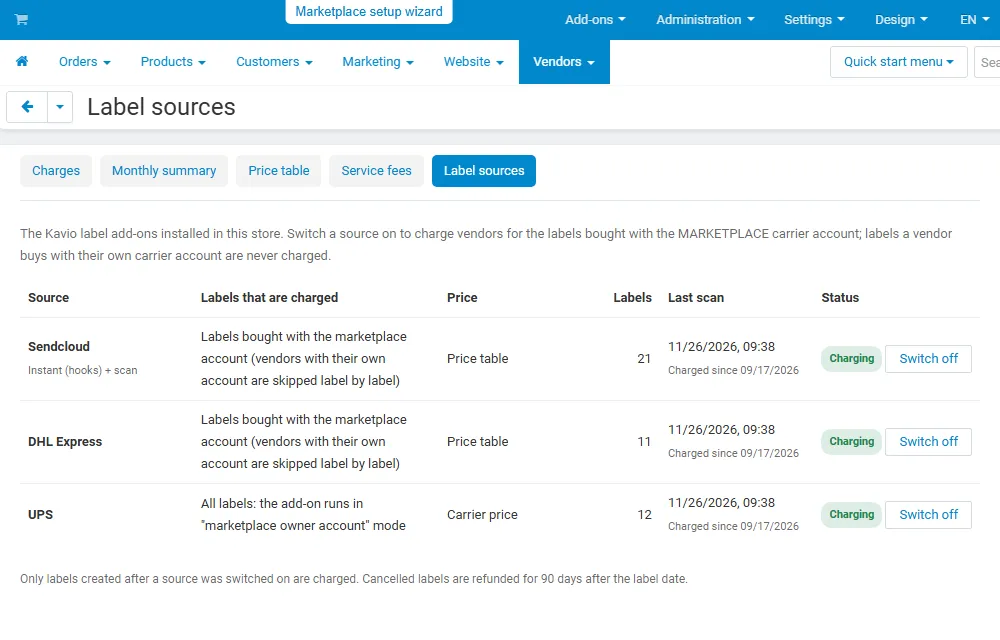
Vendors > Label & service charges > Label sources lists our label add-ons installed in your store. Switch a source on to charge vendors for its labels; only labels created after you switch it on are charged (older labels are never billed).
Which labels are charged:
- Sendcloud, DHL Express, MyParcel, PostNord, Bring, Canada Post, USPS: these add-ons store which account bought each label. Labels bought with the marketplace account are charged; labels a vendor bought with their own account are skipped label by label.
- UPS, FedEx, DPD, GLS, DHL Parcel Germany, InPost, Royal Mail, Packeta, Colissimo: these add-ons use one account mode for all vendors. When the add-on runs in “marketplace owner account” mode (its own setting), all its vendor labels are charged; when vendors use their own accounts, none are.
A label is charged to the vendor of the order it was created for. Labels for the marketplace’s own orders are not charged. Sendcloud 1.2 and later reports new and cancelled labels at once; the other sources are read on every run.
Details that matter for money:
- Only real labels are charged. A row the label add-on writes while it is still talking to the carrier (pending, outcome unknown) is skipped until it has a tracking number; UPS, FedEx, Canada Post and MyParcel are charged only when the label has its tracking number (a MyParcel concept without a printed label is not charged; MyParcel letters, mailbox and digital stamp shipments without track & trace are never charged). A created label whose barcode arrives later (MyParcel) or a GLS parcel prepared but not printed yet waits as pending and is charged once the tracking number is there. A pending row waits up to 3 days; after that the scan moves on. Rows above a waiting row are still read (up to 5000 per run).
- A label row the label add-on deletes is NOT refunded automatically: some label add-ons (UPS, FedEx, Canada Post, USPS) delete the label rows of a deleted order although the label stays billed at the carrier. The charge is flagged “Label row removed: check” and counted on the Charges page; refund (or void) it there with one click once you know the carrier voided the label.
- The account mode is read when the label is scanned. For UPS, FedEx, DPD, GLS, DHL Parcel Germany, InPost, Royal Mail, Packeta and Colissimo the add-on’s “marketplace owner account” setting decides, and these add-ons do not store it per label. Before you change that setting in a label add-on, click Run now on the Charges page so the labels made until then are charged with the old mode.
- Sendcloud labels from before Sendcloud 1.1 (account unknown) count as marketplace labels unless Sendcloud’s old “owner mode” was off (then they belonged to the vendor’s account, as Sendcloud itself decides). Only labels created after you switch the source on are read anyway.
Price table
Section titled “Price table”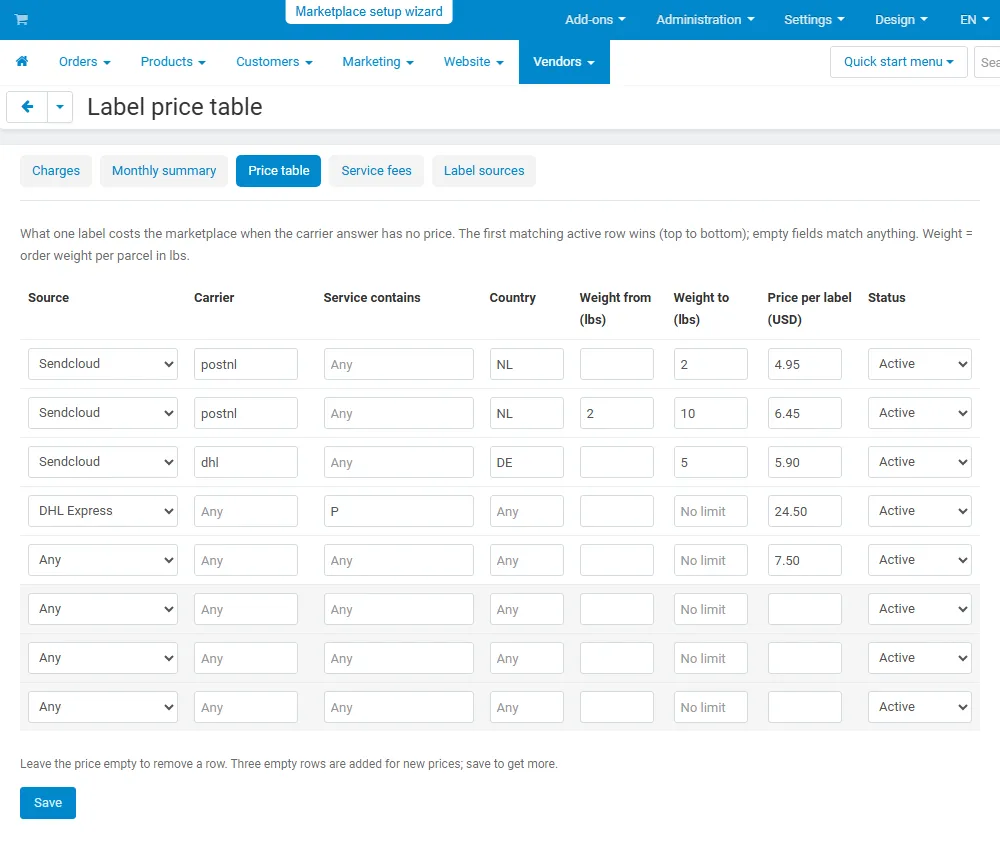
Price table tab: what one label costs the marketplace when the carrier answer has no price. Each row has a source, carrier (contains), service (contains), destination country and a weight band (order weight per parcel, in your store’s weight unit), plus the price per label. Empty fields match anything; the first matching active row from the top wins. Leave the price empty to remove a row.
How a label is priced:
- The carrier’s own price, when the label add-on stores it in your primary currency (UPS, FedEx and Canada Post net charge; USPS postage + fees).
- Otherwise the first matching row of the price table, multiplied by the number of parcels of the label.
- Otherwise the default price per label (settings), multiplied by the parcels.
- Then the markup % and the handling fee are added.
No price at all: the charge waits on the Charges page with the note “No price found”; set the amount and approve it.
Service fees
Section titled “Service fees”Service fees tab: monthly fees such as warehouse storage, packaging materials, a photo service or an account fee.
- Applies to: all active vendors, vendors on chosen vendor plans (needs the core Vendor plans add-on), or selected vendors.
- A fee is charged once per vendor and month, on the fee day or the first run after it. A new fee starts with the month in which you create it; earlier months are not charged.
- Only active vendors are charged (pending, suspended and disabled vendors are skipped).
- Disable a fee to stop it; deleting a fee keeps the charges already made.
Cron job
Section titled “Cron job”Every run scans the label sources, refunds cancelled labels, records the month’s service fees and posts approved charges. Run it every 15 minutes:
*/15 * * * * php /path/to/store/admin.php --dispatch=kv_label_charges.cronor call admin.php?dispatch=kv_label_charges.cron&cron_password=<your cron password> (Settings > Security settings > Cron password). The exact command and URL are shown in the add-on settings. Without a cron job the admin panel runs it at most every 10 minutes while someone works there. Run now on the Charges page runs it at once.
Privileges
Section titled “Privileges”Administrators need the privileges View label & service charges and Manage label & service charges (Customers > User groups > Privileges, group “Label & service charges”); both are given to administrators by default.
Vendors only see their own charges, monthly summary and CSV, and only when Vendors see their charges is on. Recording, pricing, approval, refunds, fees, sources and the price table are administrator-only.
License
Section titled “License”Enter your license key on the License tab. Without a valid license no new charges are recorded or posted; existing charges, reports and CSV exports stay available, and labels created meanwhile are charged once the license is valid again.