

Configuration
Open Add-ons → Manage add-ons → Vendor Catalog Guardrails → Settings. The rules themselves are under Vendors → Catalog Guardrails → Rules.
General
Section titled “General”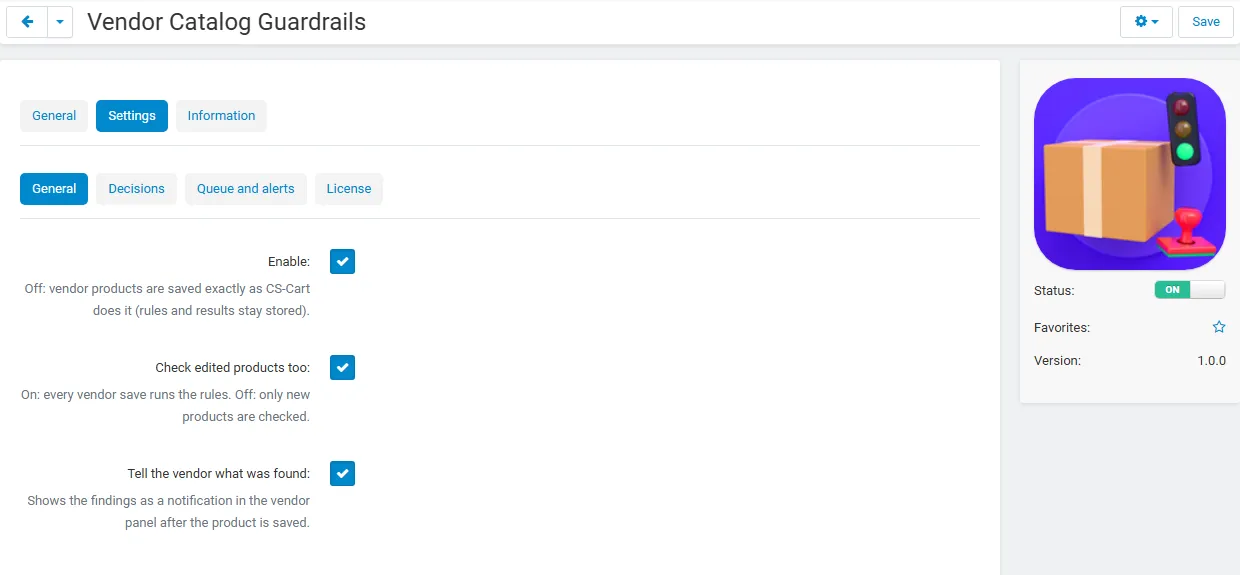
| Setting | Default | Description |
|---|---|---|
| Enable guardrails | On | Off: vendor products are saved exactly as CS-Cart does it. Rules, results and the log stay stored. |
| Check edited products too | On | On: every vendor save runs the rules. Off: only new products are checked. |
| Tell the vendor what was found | On | Shows the findings as a notification in the vendor panel after the product is saved. |
Decisions
Section titled “Decisions”| Setting | Default | Description |
|---|---|---|
| Auto-reject on reject rules | On | A product that fails a rule with the action Reject is disapproved at once, with the reason the vendor reads. Off: such a product waits in the queue for a person. |
| Auto-approve | Off | A product waiting for approval is approved when its score reaches the threshold and no reject rule failed. Off: every product waits for a person. |
| Auto-approve score | 90 | Minimum score for automatic approval. |
| Auto-approve score of trusted vendors | 60 | Minimum score when the vendor is on the Trusted vendors list. Reject rules still apply to trusted vendors. |
| Hold edited products that fail | Off | On: a published product that fails a rule after a vendor edit goes back to “Requires approval”. Off: the result is stored and shown, the product stays live. |
Queue and alerts
Section titled “Queue and alerts”| Setting | Default | Description |
|---|---|---|
| Moderation SLA (hours) | 48 | How long a product may wait in the queue. Later entries are marked overdue. |
| SLA alert e-mail | empty | One e-mail lists the products that passed their SLA (each product once). Needs the cron URL shown in the settings. Empty: no e-mail, overdue products are still marked in the queue. |
| Cron URL | generated | Call it once an hour, for example curl -s "<url>". The key in the URL is created on install. |
| Delete all data on uninstall | Off | Off keeps rules, reason templates, trusted vendors, results, the log and these settings when you uninstall; they are back after you install the add-on again. On deletes all of it permanently on the next uninstall. |
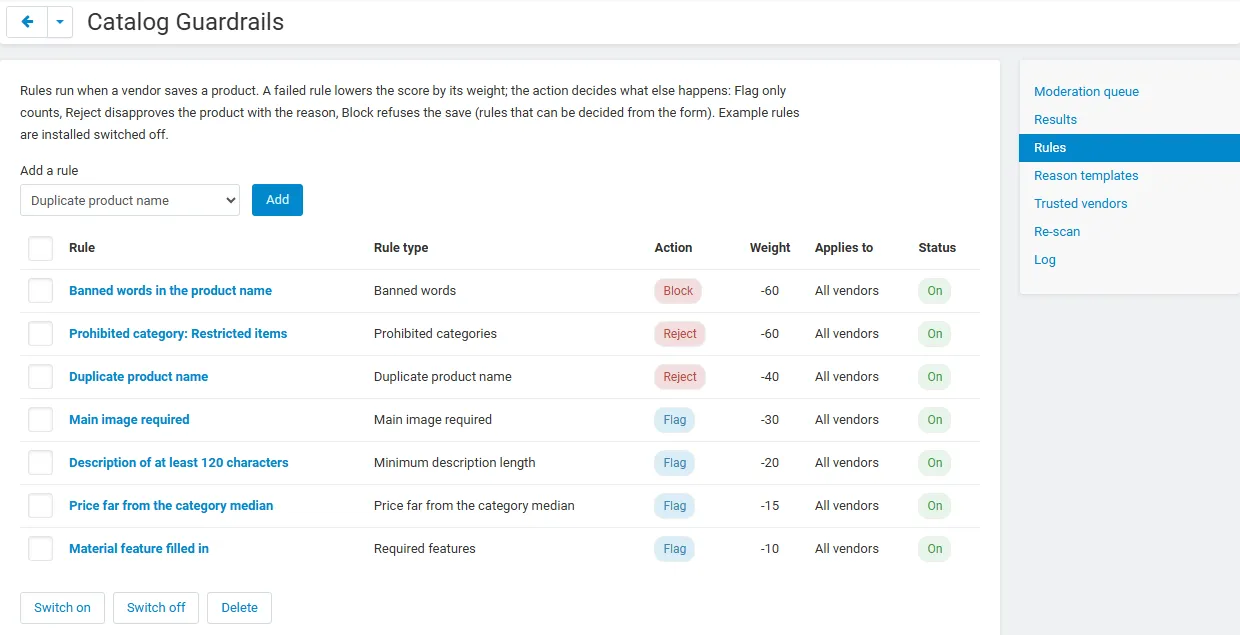
Each rule has a type, a title, an action, a weight (points taken from the score of 100 when it fails), a vendor plan it applies to (all vendors, vendors without a plan, or one plan) and an optional reason template. Example rules are installed switched off; switch on what applies to your marketplace.
| Type | Fails when | Parameters |
|---|---|---|
| Duplicate product name | the name equals another product’s name (case and spaces ignored) | compare with all vendors or the same vendor |
| Duplicate product code (SKU) | the code equals another product’s code | same |
| Duplicate GTIN | the chosen feature (GTIN / barcode) has the value of another product | feature, scope |
| Prohibited categories | a category of the product is in the list (optionally with sub-categories) | categories, include sub-categories |
| Allowed categories only | a category is outside the list; with a plan, each plan gets its own categories | categories, include sub-categories |
| Main image required | no main image | none |
| Number of images | fewer or more images (main + additional) than allowed | minimum, maximum (0 = off) |
| Minimum description length | the text (HTML removed) is shorter | characters, full / short / either |
| Required features | a required feature has no value, optionally only in some categories | features, categories |
| Price range | below the minimum or above the maximum | minimum, maximum (0 = off) |
| Price far from the category median | differs from the median of the category by more than the percentage | percent, minimum number of peers |
| Large price change on an edit | an edit changes the price by more than the percentage | percent |
| Banned words | the name / description / promo text contains a word or phrase | list, fields |
| Catalog Quality Audit score | the product scores below the minimum there (needs that add-on) | minimum score |
Actions:
- Flag only lowers the score. The product is held in the queue unless its score still reaches the auto-approve threshold.
- Reject disapproves the product (core status “Disapproved”) with the reason; the vendor fixes it and saves again.
- Block refuses the save, so nothing is stored and the vendor gets the form back with the error. It is available for rules that can be decided from the submitted form (duplicates, categories, price, description, banned words). A rule that needs the saved product (images, required features, Catalog Quality Audit) cannot block and works as Flag or Reject.
Reason templates
Section titled “Reason templates”Vendors → Catalog Guardrails → Reason templates. A template is the text the vendor reads. [details] is replaced by what failed (the limit, the category, the words) and [rule] by the rule title. Attach a template to a rule, or pick one when you reject products in the queue. A rule without a template uses a built-in message.
Multi-Vendor
Section titled “Multi-Vendor”- Vendors open Products → Guardrail results: their own products, the score, the findings and the rules that apply to their plan. They cannot see other vendors’ products, the rules page, the queue actions, the trusted list or the log.
- The product page of a vendor shows a short result box above the images.
- The privileges are
view_kv_vcgandmanage_kv_vcg(user groups of administrators). - Administrators are never checked or blocked when they save a product; they use Re-check and Re-scan.