

UK Marketplace Starter Kit for Multi-Vendor
Edition: Multi-Vendor only · Latest version: 1.0.0 · Requires: CS-Cart 4.17.2+ · Changelog: view
UK marketplace setup in one afternoon. This kit puts the Kavio Labs add-ons a UK marketplace on CS-Cart Multi-Vendor needs into one purchase: a vendor application form for company and VAT details, vendor document checks, the HMRC platform report, Royal Mail shipping, Pay by Bank and a cookie banner with UK consent defaults.
The UK platform report for calendar year 2026 is due on 31 January 2027. Digital platforms that are resident in the UK, incorporated under UK law or managed from the UK report their reportable sellers to HMRC for each calendar year by 31 January of the following year, and give every reported seller a copy of its information by the same date.
Honest scope: the kit prepares forms, records and files. Which sellers you must report, the filing with HMRC, and your contracts with Royal Mail and TrueLayer stay with you. This page is product documentation, not tax or legal advice.
What is in the kit
Section titled “What is in the kit”| Product | What it does in the kit | Documentation |
|---|---|---|
| Vendor Onboarding & Registration Builder | Your own multi-step vendor application form: business type, company number, VAT number, UTR, payout account holder and documents, with format and length checks, conditions and an Application tab for your review. | Vendor Onboarding & Registration Builder |
| MV Compliance Suite | UK (HMRC) reporting: reportable sellers by residence and period, the low-activity exclusion, NINO, UTR, company number and GB VAT format checks, the XML file checked against the HMRC schema, nil returns, corrections and seller statements. Also DAC7 and the DSA notice and action tools. | MV Compliance Suite |
| Vendor KYC & Verification (comes with MV Compliance Suite) | Document types per vendor plan and business type, a review queue, expiry reminders, a Verified seller badge and, if you choose, payouts held until a vendor is verified. Its seller tax profile also feeds the HMRC report; the TIN, the date of birth and the account number in it are stored encrypted. | Vendor KYC & Verification |
| Royal Mail Click & Drop Shipping | Tracked 24, Tracked 48, Special Delivery and international services at checkout from your own rate table, orders and labels through Click & Drop, tracking numbers back into the CS-Cart shipment; one marketplace account or one account per vendor. | Royal Mail Click & Drop Shipping |
| TrueLayer Pay by Bank | Pay by Bank at checkout: the buyer pays from their bank app in GBP or EUR, the order is paid when the money has settled in the marketplace owner’s TrueLayer account, refunds from the order page. | TrueLayer Pay by Bank |
| Cookie Consent Manager | Accept all, Reject all and Customize with equal weight, scripts blocked until consent, Google Consent Mode v2 denied by default for UK visitors, a consent log. | Cookie Consent Manager |
6 license keys: the 5 products plus Vendor KYC & Verification, included with MV Compliance Suite. All are for your store domain.
Before you start
Section titled “Before you start”- CS-Cart Multi-Vendor or Multi-Vendor Ultimate 4.17.2 – 4.22.x on PHP 7.4 – 8.3.
- A Royal Mail Click & Drop account (OBA or pay as you go) and its API key.
- A TrueLayer merchant account approved for live payments (test in sandbox first).
- Your platform operator details for HMRC (the operator ID of the HMRC digital platform reporting service).
- A cron job for the Royal Mail and TrueLayer queues (each add-on’s configuration page shows the command). For Vendor KYC & Verification a cron job is optional: without it, its scheduled task (expiry, reminders) runs at most once an hour when someone opens the admin or vendor panel.
UK marketplace setup in one afternoon
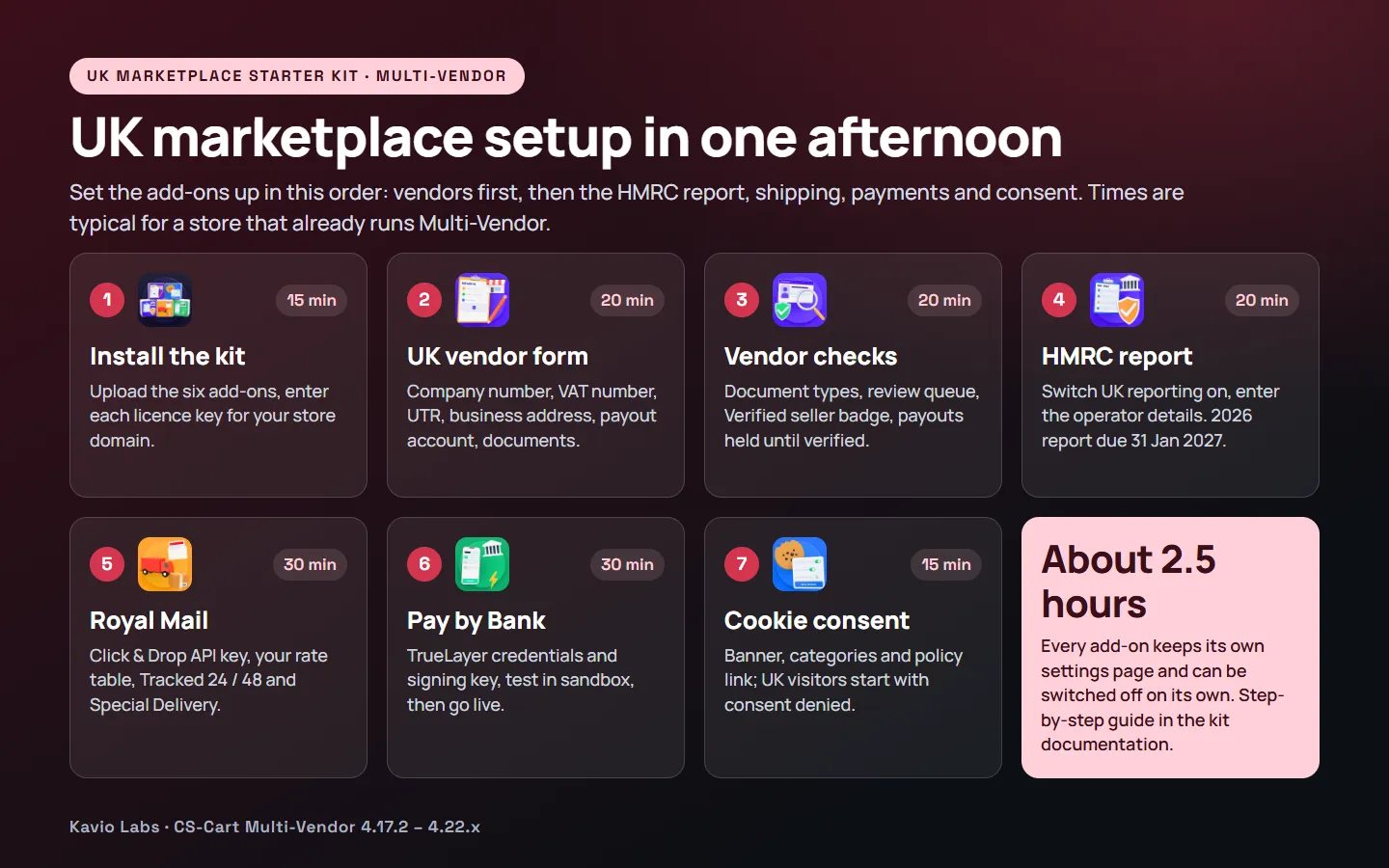
Section titled “UK marketplace setup in one afternoon”Set the add-ons up in this order: vendors first, then the HMRC report, shipping, payments and consent. The times are typical for a store that already runs Multi-Vendor; about 2.5 hours in total.
1. Install the kit (15 minutes)
Section titled “1. Install the kit (15 minutes)”Install all six add-ons and enter the license key of each on its License tab. See Installation.
2. The UK vendor application form (20 minutes)
Section titled “2. The UK vendor application form (20 minutes)”Open Vendors > Vendor applications, gear menu Vendor application form, and build the form in the UK vendor form template below. Open Vendors > Seller profile fields and make sure the core address fields (address, city, postcode, country) and the phone number are shown and required on the application form; the template does not repeat them.
3. Vendor checks (20 minutes)
Section titled “3. Vendor checks (20 minutes)”Open Vendors > Vendor verification. Keep or edit the document types the add-on creates; for UK sellers we suggest:
- Certificate of incorporation, for companies (limit the type to the business type “company”).
- Proof of address (utility bill or bank statement, not older than 3 months), with an expiry of 12 months after approval.
- Identity document of the owner or a director.
- Bank statement showing the payout account.
Under Restrictions choose whether payouts wait until a vendor is verified. Files a vendor uploaded with the application form appear on the vendor’s review page: choose a document type under Use as and click Use file, so the vendor does not upload the certificate twice. Identity documents are best collected here: Vendor KYC & Verification can store files encrypted (AES-256, setting on by default; needs OpenSSL and local file storage).
4. The HMRC report (20 minutes)
Section titled “4. The HMRC report (20 minutes)”- In Add-ons > MV Compliance Suite > Settings, section UK reporting (HMRC), tick Enable UK reporting (HMRC), enter the Platform operator ID of the HMRC service (the 15-character ID under “View your platform operators” in the HMRC service) and, if it differs from the TIN of your DAC7 operator data, your company’s UTR in Operator TIN (UTR) for the UK report.
- In Add-ons > Vendor KYC & Verification > Settings > DAC7 seller report, tick Enable the DAC7 seller report (the UK report needs it) and enter your operator data under Platform operator (your company): legal name, address, tax number and platform names. The UK report reads the same seller data set.
- Open Vendors > Compliance Suite (the Compliance Center), tab UK (HMRC). Every seller with sales in the period gets a status (reportable, needs data, excluded, out of scope). Open a seller to enter its UK identifiers: NINO for individuals living in the UK, UTR for partnerships and trusts, Companies House number for companies and LLPs, and the GB VAT number. The identifiers your vendors gave on the application form are on their Application tab; copy them across. Values are structure-checked and stored encrypted; nothing is looked up online.
- After 31 December 2026: build the file for 2026, download it and upload it in the HMRC digital platform reporting service by 11:59pm on 31 January 2027. Record the result on the page, then Publish statements so every reported seller sees its copy in the vendor panel by the same date.
5. Royal Mail (30 minutes)
Section titled “5. Royal Mail (30 minutes)”- In Click & Drop open Settings > Integrations, add an integration of the type Royal Mail Public API and copy the key.
- On the add-on’s Connection page paste the key, choose the account type (pay as you go or OBA) and click Save and test. Choose whether you ship for every vendor or each vendor connects its own Click & Drop account (Marketplace owner mode in the add-on’s settings, General section), then fill the Rates tab: the price per weight band for each service, in the UK zone for the UK services (Tracked 24, Tracked 48, Special Delivery) and in the EU and rest-of-the-world zones for the international services. Click & Drop has no live rate quote, so the prices are yours.
- Create one shipping method per service you sell (Administration > Shipping & taxes > Shipping methods).
6. Pay by Bank (30 minutes)
Section titled “6. Pay by Bank (30 minutes)”- In TrueLayer Console create a sandbox app. On the add-on’s Connection page (Orders > TrueLayer payments > Connection, or the Connection button in the add-on’s settings) enter the client ID and secret, tick Generate a new key pair, upload the public key it shows in Console and enter the key ID. Register the webhook and return addresses the page lists, then press Save and test.
- In Administration > Payment methods, add a method (for example “Pay by bank”) with the processor TrueLayer and activate it.
- Place a test order in sandbox, check that it turns paid when the payment is settled, then switch to live. In Multi-Vendor the payments go to the marketplace owner’s merchant account; vendor payouts stay in your usual Multi-Vendor flow.
7. Cookie consent (15 minutes)
Section titled “7. Cookie consent (15 minutes)”- In the settings of Cookie Consent Manager (Add-ons > Manage add-ons), choose the banner layout, check the four categories, tick the services to block under Script blocking (or add custom rules) and choose your cookie or privacy policy page in Privacy policy page.
- If the core GDPR add-on shows its own cookie notice, switch it off with the button on the settings page, so visitors see one banner.
- Visitors from the UK, the EEA and Switzerland start with Google Consent Mode v2 denied until they choose. Raise the policy version when your policy changes; every visitor is asked again.
UK vendor form template
Section titled “UK vendor form template”Build these sections and fields in Vendor application form (step 1 stays the core account form). Field types and formats are the ones the add-on offers: text with the formats e-mail, web address, phone, number or letters-and-digits, text area, drop-down list, multiple choice, checkbox, date and file upload. “Show only if” compares with the value of another field, without regard to upper and lower case.
Section “Your business”
Section titled “Section “Your business””| Field | Type | Required | Validation | Show only if | Help text |
|---|---|---|---|---|---|
| Business type | Drop-down list: Limited company (Ltd, LLP or PLC), Sole trader, Partnership |
Yes | How your business is registered in the UK. | ||
| Trading name | Text | No | max 120 | The name customers see, if it differs from the company name. | |
| Companies House number | Text, letters-and-digits | Yes | min 8, max 8 | Business type = Limited company (Ltd, LLP or PLC) |
8 characters, for example 01234567 or SC123456. |
| Unique Taxpayer Reference (UTR) | Text, number | No | min 10, max 10 | Sole traders and partnerships: your 10-digit UTR from HMRC. Leave it empty for a company. | |
| Registered for VAT | Checkbox (“My business is registered for VAT in the UK”) | No | |||
| VAT number | Text, letters-and-digits | Yes | min 11, max 14 | Registered for VAT = Y |
GB followed by 9 digits, without spaces, for example GB123456789. |
| What will you sell? | Multiple choice (your categories) | Yes | |||
| Website or online shop | Text, web address | No | Where customers can already find you, if anywhere. |
Section “Payouts”
Section titled “Section “Payouts””| Field | Type | Required | Validation | Help text |
|---|---|---|---|---|
| Account holder name | Text | Yes | max 120 | The name on the UK bank account your payouts go to. |
| Bank statement or bank letter | File upload, pdf,jpg,png, 1 file, 5 MB, required document |
Yes | A recent statement or letter that shows the account holder, sort code and account number. |
Do not ask for the sort code and account number in a text field of the form: form answers are stored as plain text. Ask for the account in the tax details form of Vendor KYC & Verification, where the account number is stored encrypted and shown masked, and use the bank statement above to check it.
Section “Documents”
Section titled “Section “Documents””| Field | Type | Required | Show only if | Help text |
|---|---|---|---|---|
| Certificate of incorporation | File upload, pdf,jpg,png, required document |
Yes | Business type = Limited company (Ltd, LLP or PLC) |
From Companies House. |
| Proof of business address | File upload, pdf,jpg,png, required document |
Yes | A utility bill, council tax bill or bank statement from the last 3 months. | |
| I confirm that these details are correct and accept the seller terms | Checkbox | Yes | Link your seller terms in the help text. |
With the core Vendor plans add-on, limit sections or fields to plans if a plan needs more (for example a “Business” plan that asks for the VAT number in every case).
Editions and compatibility
Section titled “Editions and compatibility”- Multi-Vendor and Multi-Vendor Ultimate 4.17.2 – 4.22.x, PHP 7.4 – 8.3. The kit is not offered for CS-Cart without vendors: the vendor form, the vendor checks and the HMRC seller report work with vendors.
- Every add-on keeps its own settings page and can be switched off on its own; nothing in the kit changes core files.
Next steps
Section titled “Next steps”Royal Mail, Click & Drop and TrueLayer are trademarks of their owners. Kavio Labs is not affiliated with or endorsed by them.