

Marketplace Campaign Events
Add-on ID: kv_campaign_events · Edition: Multi-Vendor only · Latest version: 1.0.0 · Compatible with: Multi-Vendor 4.17.2 – 4.22.x, PHP 7.4 – 8.3 · Changelog: view
The problem
Section titled “The problem”A marketplace sale (January sale, Black Friday, back to school) needs dozens of vendors to lower their prices at the same time, under the same rules, for the same dates. Without a tool, offers arrive by e-mail or spreadsheet, someone edits prices by hand, discounts are checked late or not at all, prices are forgotten after the sale, and the share of the discount the marketplace promised to pay is settled with each vendor at the end of the month.
Who it is for
Section titled “Who it is for”Operators of CS-Cart Multi-Vendor marketplaces who run sale events together with their vendors. The add-on needs the vendor panel and the vendor accounting of Multi-Vendor, so it is sold for Multi-Vendor and Multi-Vendor Ultimate only; there is no CS-Cart or CS-Cart Ultimate edition.
How it works
Section titled “How it works”- You create an event in Marketing > Campaign events: nomination period, event dates, rules (minimum discount, eligible categories, minimum stock, products per vendor, 30-day lowest price check) and the marketplace funding share, for example 25% of every discount.
- You publish it. Vendors see it in their panel, pick products and a discount (or a fixed event price) and an optional unit limit. Every nomination is checked against the rules at once.
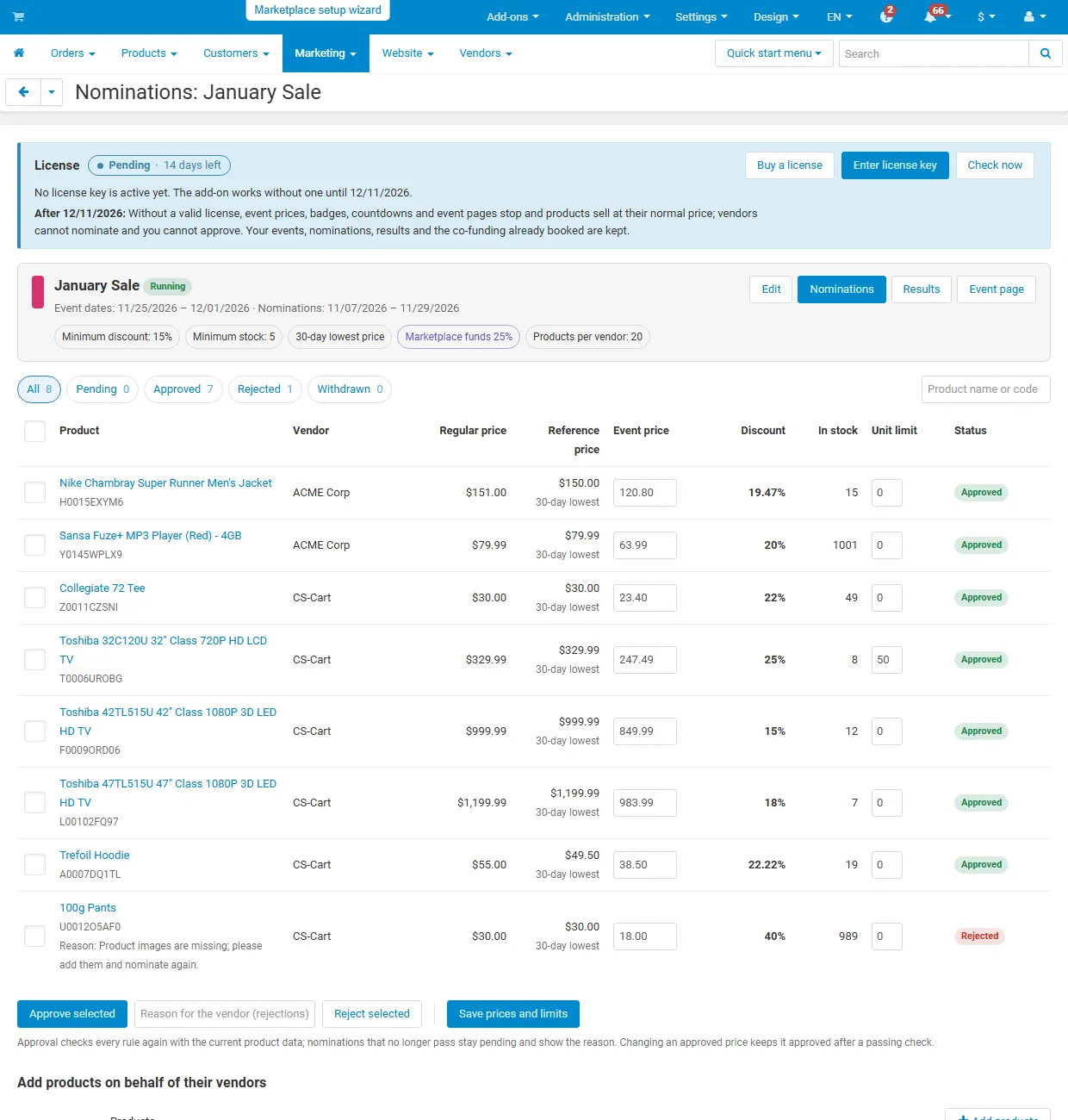
- You review the nominations and approve or reject them in bulk, with a reason for the vendor. Approval runs every check again with the current product data.
- Each event is one core catalog promotion. While the event runs, approved products sell at their event price on product pages, lists, quick view, cart and orders, with taxes and other promotion-aware add-ons working as usual. When the event ends, the core stops the promotion and prices return by themselves.
- For every vendor order sold at an event price, the marketplace share of the discount is booked to the vendor balance in Vendors > Accounting. It follows the order status like the order itself, and a refunded return takes the share of the returned units back.
- The Results page shows orders, units, revenue, discount, marketplace funding and vendor share per vendor, with a CSV export. Vendors see their own row.
Shoppers see a badge on the product image, a strip under the price with a countdown, and an event page that lists all event products.
Compatibility
Section titled “Compatibility”- CS-Cart Multi-Vendor 4.17.2 to 4.22.x, Multi-Vendor Ultimate included. PHP 7.4 to 8.3 as your CS-Cart version allows.
- Responsive, Bright and Nova storefront themes (and themes based on them).
- Full page cache (4.21): the storefront output is the same for every visitor; the countdown runs in the browser.
- Works next to: Vendor Coupons (sales that vendors start themselves), Omnibus Price History (30-day lowest price for the minimum discount check; it records event prices like any promotion price), Urgency & Social Proof (it shows its own countdown for promotions with an end date; ours then hides by default), Discount Rules (its stacking policy applies to the event promotion like to any other promotion).
What it does not do
Section titled “What it does not do”- It does not create coupons, cart-level discounts or vendor-initiated sales (use Vendor Coupons or core promotions for that).
- It does not pay vendors: the funding is booked to the vendor balance; payouts stay with your usual payout process.
- It does not send e-mails to vendors about decisions; vendors see the status and reason in their panel.
- The funding is a share of the price discount only; shipping and taxes are not co-funded. There is no budget cap per event in 1.0.
- A product can be in one event at a time; variations and vendor offers of a common product are nominated one by one.
- Without Omnibus Price History the minimum discount is measured from the regular price, not from a 30-day history.
Documentation
Section titled “Documentation”| Page | Contents |
|---|---|
| Installation | Requirements, install, upgrade, uninstall (what is kept) |
| Configuration | Settings, event fields, rules, funding, privileges, license |
| Usage | Running an event as operator and as vendor, results, returns |
| Developer notes | Price engine, money model, tables, hooks |
| FAQ | Common questions |