

Configuration
Open Add-ons → Manage add-ons → Buyer Service Fee → Settings for the general settings and Orders → Buyer service fees for the rules. Both are for the marketplace administrator; vendors have no access.
General
Section titled “General”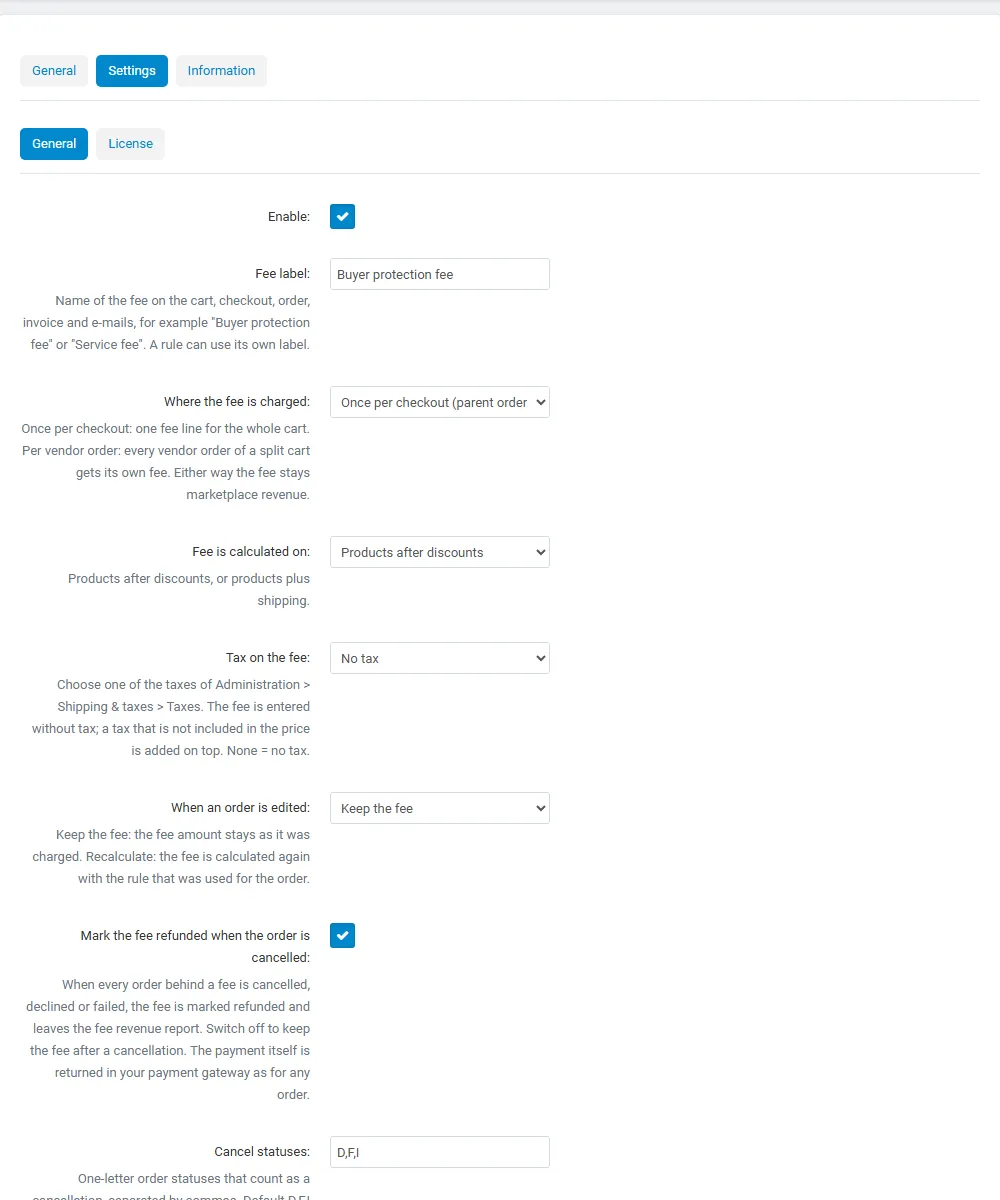
| Setting | Default | Description |
|---|---|---|
| Enable | On | Turns the fee on or off without uninstalling the add-on. |
| Fee label | Buyer protection fee | Name of the fee in the cart, checkout, order, invoice and e-mails. A rule can use its own label. |
| Where the fee is charged | Once per checkout | Once per checkout: the fee is calculated once on the whole cart and every vendor order carries its share (split by the value of the vendor orders, the way core splits a payment surcharge), so the order total of the buyer is one fee. Per vendor order: every vendor order is priced on its own (own rule, own minimum and fixed amount), the parent total is the sum. In both cases the fee is marketplace revenue. |
| Fee is calculated on | Products after discounts | Products after discounts, or products plus shipping. |
| Tax on the fee | No tax | One of the taxes of Administration → Shipping & taxes → Taxes. The fee is entered without tax; a tax that is not included in the price is added on top. An included tax stays inside the fee amount. |
| When an order is edited | Keep the fee | Keep the fee: the amount stays as it was charged. Recalculate: the fee is calculated again with the rule that was used for the order (the share of a checkout fee is always kept). An order that was placed without a fee (for example before the add-on was installed) never gets one when it is edited. |
| Mark the fee refunded when the order is cancelled | On | When every order behind a fee is cancelled, declined or failed the fee is marked refunded and leaves the fee revenue report. Off keeps the fee after a cancellation. |
| Cancel statuses | D,F,I | One-letter order statuses that count as a cancellation (Declined, Failed, Canceled). |
| Revenue statuses | P,C | One-letter order statuses that count in the fee revenue report (Processed, Complete). |
| Buyer protection page URL | empty | Optional link shown as a question mark next to the fee and in the product note. |
| Show a fee note on product pages | Off | Shows the note text under the product price. |
| Product page note | A buyer protection fee is added at checkout. | The text of the note. It is the same for every visitor. |
| Delete all data on uninstall | Off | Off keeps the rules, the fee records of placed orders and the settings when you uninstall (reinstall finds them). On deletes everything with the next uninstall. |
The License section shows the license status. Without a valid license no fee is charged; carts and orders are calculated as if the add-on was off, and your rules and fee records stay.
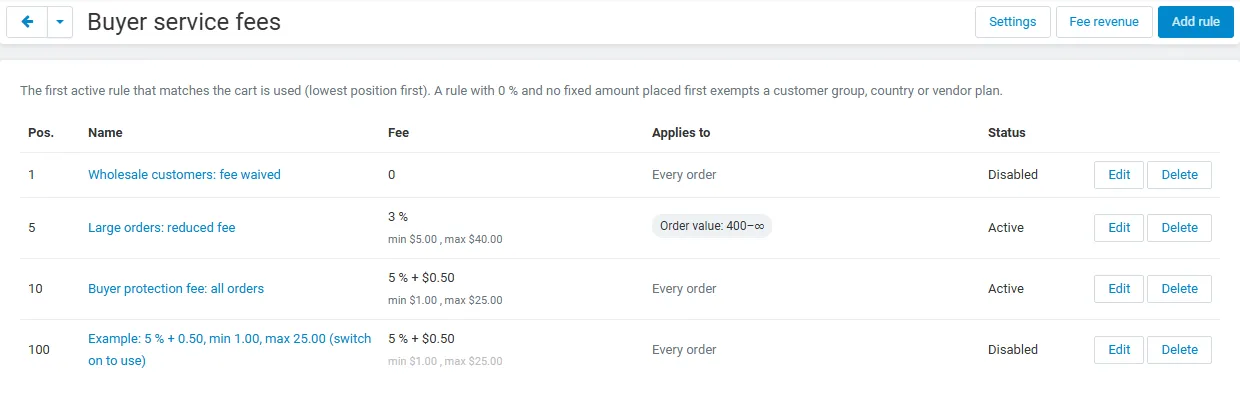
A rule has a name, a position, a status, an optional label and the fee:
| Field | Description |
|---|---|
| Percent of the order value | Percent of the amount the fee is calculated on. |
| Fixed amount | Added to the percent part. Enter it in the primary currency; the store converts it for other currencies. |
| Minimum fee / Maximum fee | The fee is never lower than the minimum or higher than the maximum (0 = none). |
Conditions (leave empty to match everything; every filled condition must match):
| Condition | Description |
|---|---|
| Order value | The rule matches only when the amount it is calculated on is inside this range. |
| Delivery countries | Delivery country, or the billing country while there is no delivery address. |
| Vendor plans | Matches when a vendor in the cart is on one of the plans. |
| Customer groups | Matches customers in one of the groups. |
| Categories | The fee is calculated only on products of these categories and their subcategories; the rule matches only when the cart has such a product. |
The first active rule that matches, from the lowest position, is used. Put a rule with 0 % and no fixed amount first to exempt a customer group, country or vendor plan.
Per vendor order mode: every vendor order is matched on its own, so each vendor can fall under a different rule (for example by plan). In checkout mode the rule is matched once for the whole cart; a vendor plan filter matches when any vendor in the cart is on that plan.
Showing the fee to buyers
Section titled “Showing the fee to buyers”The fee is shown as its own line with its label and amount in the cart and on the checkout page before the buyer places the order, and on the order pages, invoices and e-mails. Consumer rules in many countries (for example in the EU and the UK) expect mandatory charges to be clear before purchase, and some expect them inside the advertised price. If the fee applies to every order, consider switching on the product page note and linking a page that explains the fee. Whether your setup meets the rules that apply to your marketplace is your decision; ask your legal adviser if unsure.
Multi-Vendor
Section titled “Multi-Vendor”- Vendors cannot see or change rules, settings, the report or refunds.
- The fee appears on the buyer’s order pages, invoices and e-mails (each vendor order shows its share). In the vendor panel the order page does not show the fee row; the vendor payout of the order is the same as for an order without a fee. The order total in the vendor panel includes the fee.
- With the Direct Payments add-on each vendor is paid directly by the buyer, so the checkout is split per vendor. Use “Per vendor order” there: the fee is then part of the commission the vendor owes the marketplace (vendor debt).