

Pick & Pack Station with Barcode Scanning
Add-on ID: kv_pick_pack · Edition: CS-Cart & Multi-Vendor · Latest version: 1.0.0 · Compatible with: CS-Cart & Multi-Vendor 4.17.2 – 4.21.x, PHP 7.4 – 8.3 · Changelog: view
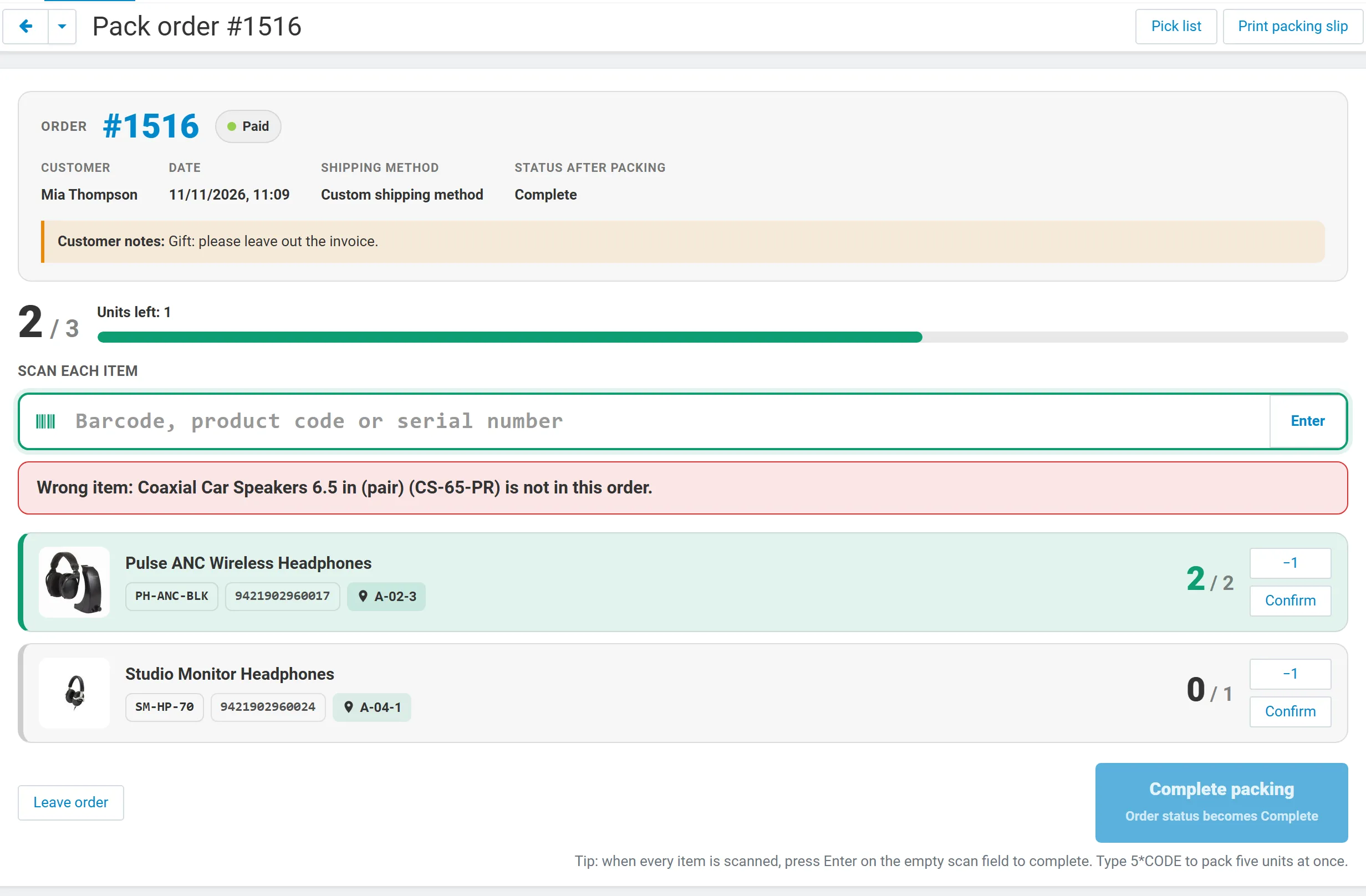
Pick & Pack Station turns any computer with a USB or Bluetooth barcode scanner into a packing table inside the CS-Cart admin panel. Packers work from a queue of orders waiting to ship, print pick lists in walking order, scan the order number and then scan every item. The order status changes only when every unit is confirmed, and every scan, warning and override is written to a pack log on the order.
CS-Cart itself can print a barcode on invoices (core Barcode add-on) and a packing slip, but it has no way to check what goes into the box. This add-on adds that check without changing how orders, stock or payments work.
- Order queue of the statuses you choose (for example Processed), oldest first, with the packer working on each order and a search by order number, customer or e-mail.
- Pick lists: one page per order with an order barcode to scan at the station, or a batch pick list that puts the same product of many orders on one line with the total and the split per order, sorted by bin location.
- Scan to verify: each scan counts one unit of the matching line. Products are found by product code or by a product feature that holds the barcode (EAN, UPC, GTIN); a UPC-A on the box matches an EAN-13 stored with a leading zero. Type
5*CODEto pack five units at once. - Options: products with options (size M and L of one shirt) share the product’s codes. When a scan fits several option lines, the station asks the packer to tap the line that matches the item in hand instead of guessing. Variations are separate products with their own codes and are checked automatically.
- Warnings with sound: a wrong item, one unit too many, or a serial number that is already sold is refused with a sound and a clear message, and logged.
- Override with a reason: an item without a readable barcode can be confirmed by hand, but only with a reason; the packer and time are logged.
- Completion changes the order status once (or keeps it), optionally notifies the customer and prints the packing slip. A double scan, a double click or a second browser tab never changes the status twice.
- Pack lock: one packer per order. Another packer sees who is working on it and can take it over (with a confirmation while the first packer is still scanning); the takeover is logged.
- Pack log on the order page (Pick & Pack tab): packer, start and end time, duration, scans, warnings, overrides and the status change.
- Packed today: orders, average pack time, warnings and overrides per packer on the queue page.
- Serial numbers: with the Kavio Labs Serial Numbers & Warranty Tracker add-on installed, serial numbers scanned at the table are linked to the order line, optional or required for every unit. Without it, everything else works the same.
- Multi-Vendor: vendors see and pack only their own orders; the marketplace owner sees all.
Documentation
Section titled “Documentation”| Page | Contents |
|---|---|
| Installation | Requirements, installing, privileges, upgrading, uninstalling |
| Configuration | Statuses, barcodes, locations, sounds, overrides, lock, serial numbers, vendors, license |
| Usage | Queue, pick lists, the station, warnings, overrides, completion, pack log, vendors |
| Developer notes | Data model, locking and idempotency, hooks, permissions, file map |
| FAQ | Scanners, printers, labels, other add-ons, license |
Compatibility
Section titled “Compatibility”| CS-Cart / Multi-Vendor | 4.17.2 – 4.21.x (all four editions) |
| PHP | 7.4 – 8.3, as supported by your CS-Cart version |
| Scanners | Any USB or Bluetooth barcode scanner in keyboard mode (it types the code and presses Enter) |
| Storefront | No storefront output: nothing changes for shoppers, full page cache is not affected |