

Configuration
Open Add-ons → Manage add-ons → Data Retention & Guest Anonymizer (or Administration → Data retention → Settings). All settings are store-wide.
General
Section titled “General”| Setting | Default | What it does |
|---|---|---|
| Enable | Yes | The kill switch. Off: no run of any kind (not even a preview) happens. Rules and history are kept. |
| Live mode (allow runs to change data) | No | No = dry run: the cron job and the buttons only count what would happen. Switch it on only after you previewed every rule and made a database backup. |
Run limits
Section titled “Run limits”| Setting | Default | What it does |
|---|---|---|
| Batch size | 200 | Records handled per step (10 to 2000). Smaller batches are gentler on a busy database. |
| Safety cap per rule and run | 2000 | A rule never handles more records than this in one run; the rest continues in the next run. Keep it low for the first runs. |
| Time budget of a run from the admin panel (seconds) | 25 | A run from the admin panel stops after this time and continues next time. The cron job uses at least 50 seconds. |
Orders
Section titled “Orders”| Setting | Default | What it does |
|---|---|---|
| Also clear the customer comment of an anonymized order | Yes | Removes the comment the customer typed at checkout. |
| Also clear the staff notes of an anonymized order | Yes | Removes the notes your staff added to the order. |
| Also clear custom profile field values of an anonymized order | Yes | Custom fields can hold a tax number or a company number. Switch this off when your invoices still need them. A reprinted invoice of an anonymized order shows no name and no address in any case. |
| Keep the country of an anonymized order | Yes | The country stays for tax and sales reports. State, city, street and postal code are always removed. |
| Text used instead of the first name | Anonymized | Shown in the order list and on documents instead of the removed name. |
| Allow rules that delete orders | No | Off: order rules can only anonymize. Orders usually have to be kept for bookkeeping, so deleting them is never on by default. Also applies to deleting return requests. Not available on Multi-Vendor. |
| Never delete orders younger than (months) | 120 | A delete rule for orders must use a period at least this long. Set it to the number of months your bookkeeping rules require; the add-on does not know your country. |
Audit log and vendors
Section titled “Audit log and vendors”| Setting | Default | What it does |
|---|---|---|
| Keep the audit log for (days) | 1095 | The audit log holds record ids, counts and times, never names or e-mail addresses. 0 keeps it forever. The cron job removes older entries. |
| Show the retention policy to vendors (Multi-Vendor) | No | Vendors get a read-only page that lists which data is anonymized or deleted after which time, and how many of their own orders were anonymized. They cannot change anything. |
Cron job
Section titled “Cron job”The settings page shows the exact cron command and URL for your store. See Installation.
Privileges
Section titled “Privileges”Administrators need View data retention rules and history to open the pages and Manage data retention to add, change, preview and run rules. Both are in the privilege group “Data retention”.
License
Section titled “License”The add-on checks its license key for your store’s domain once a day from the admin panel (never from the storefront). Development hosts such as localhost always work.
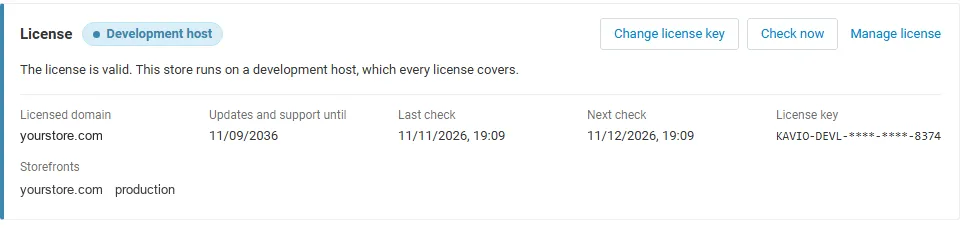
| Key | Enter it in Settings → License, or use the CS-Cart Marketplace license number in Add-ons → Manage add-ons. |
| Check now | The Check now button on the License tab repeats the check at once. |
| Server not reachable | The add-on keeps working during a grace period. |
Without a valid license: scheduled and manual runs stop, so nothing is anonymized or deleted any more. Your rules, history and audit log are kept and previews keep working. The admin pages stay available.