

Usage
The age gate
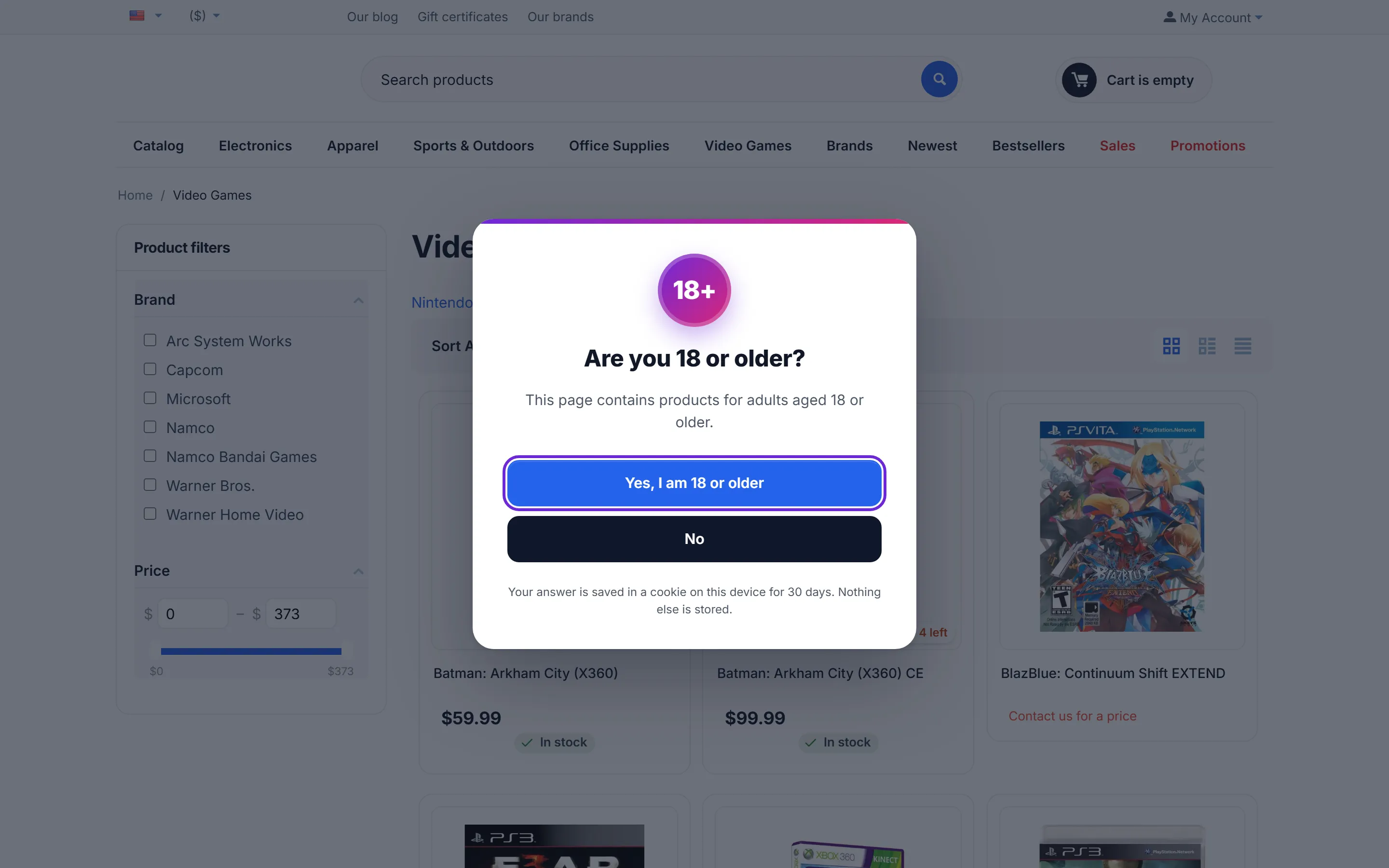
Section titled “The age gate”When a visitor opens a restricted page (or any page with the site-wide gate), a dialog asks for their age:
- Yes / No buttons: “Are you 18 or older?” with Yes, I am 18 or older and No.
- Date of birth: day, month and year fields. The age is computed in the browser with the same rules as at checkout (leap-day rule, completed years). The date itself is never sent or stored; only the age is kept in the cookie.
The answer is saved in the cookie kv_agv on the visitor’s device for the number of days you set. A visitor who confirmed 21 is not asked again on 18+ pages. A visitor who answers No (or whose date of birth is under the age) sees the “Sorry, you cannot enter” panel with a button to the home page (or is sent to the address you set); this answer is kept until the browser is closed, with an “I made a mistake” link.
Accessibility: the gate is a dialog (role="dialog", aria-modal), the page behind it is hidden from screen readers and the keyboard, Tab stays inside the dialog, the first button gets the focus, and error messages are read aloud. Escape does not close it, because the question must be answered. On phones the gate opens as a bottom sheet.
The gate is a decision in the browser: search engines and visitors without JavaScript see the page. Use the checkout check to block orders.
Hiding restricted products
Section titled “Hiding restricted products”With Hide restricted products in product lists until the gate is passed on, guests who have not confirmed the age do not see restricted products in categories, search results and product blocks. After the gate, the next page shows them (up to the confirmed age). Signed-in customers whose age was confirmed at checkout see them as well.
With the full page cache add-on of CS-Cart 4.21 active, cached pages are shared by all guests, so restricted products stay hidden from every guest and are shown to signed-in customers whose age was confirmed. Without the full page cache, the guest’s cookie is used.
Checkout
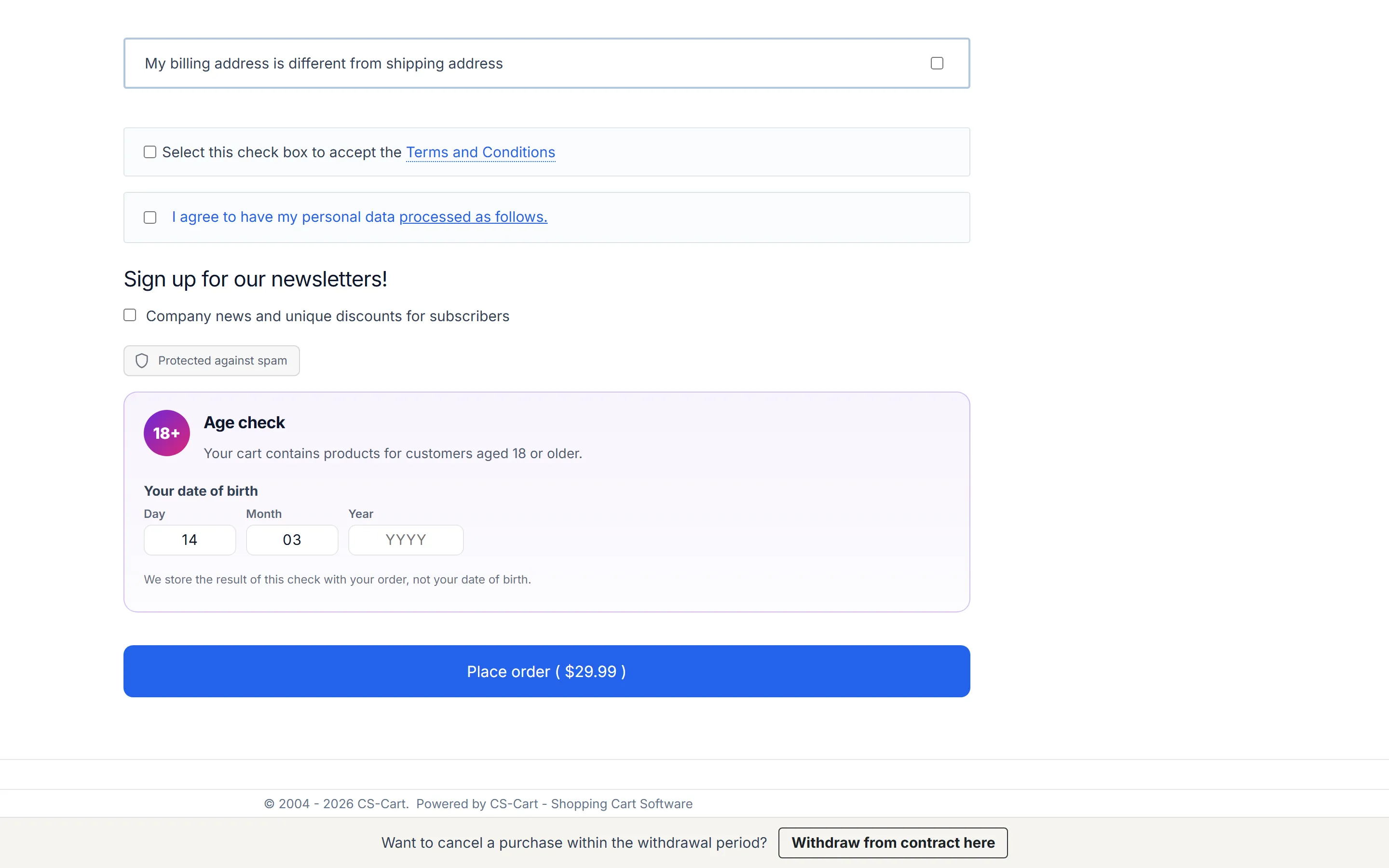
Section titled “Checkout”When the cart contains restricted products, an Age check card appears above the Place order button. It names the required age: the strictest item in the cart, raised by the Minimum age by shipping country setting when the order ships to a listed country.
- Date of birth: the customer enters day, month and year. Under the age, the order is not placed, an error is shown and the attempt is logged (“Refused”, reason “Under the required age”). Invalid dates (31 February, future dates) are refused the same way.
- Declaration checkbox: “I confirm that I am 18 or older.” The order is placed only when it is ticked.
- Signed-in customers whose age was confirmed by date of birth on an earlier order see “Your age was confirmed on an earlier order” and are not asked again (setting).
The age is computed in the store time zone (Settings → Appearance), so a customer whose birthday is today in your store’s time zone is counted as one year older from midnight.
A safety net also refuses orders with restricted items that were not checked in the same session, for example through a payment button that skips the checkout page.
Order records
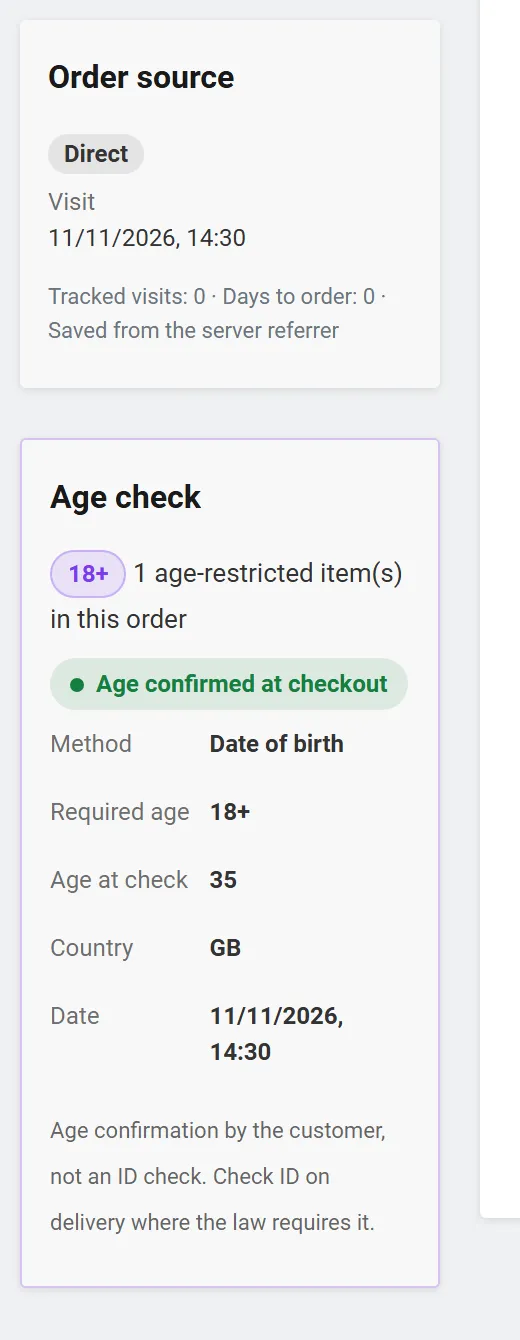
Section titled “Order records”Every placed order with restricted items gets a record. On Multi-Vendor each vendor order of a split cart gets its own record. The order page in the admin and vendor panel shows the Age check card in the sidebar:
- “Age confirmed at checkout” or “No age check recorded”;
- method (Date of birth, Declaration checkbox, Confirmed earlier), required age, age at the check, country, time;
- the date of birth only when Store the full date of birth with the check is on;
- “N age-restricted item(s) in this order”, also for orders without a record (for example orders created by an administrator).
The log
Section titled “The log”Products → Age rules → Age check log lists every check: placed orders (with a link) and refused attempts (“Not placed”). Filter by result, method or order ID, and click Export CSV for your records. Spreadsheet formulas in the export are neutralised (a value starting with =, +, - or @ gets a leading apostrophe).
Log entries and remembered customer ages older than Delete log entries and remembered ages after (days) are deleted automatically, at most once a day (on the next admin request or placed order). Gear icon → Delete entries older than the retention period runs it at once. Deleting an order deletes its records. Deleting a customer deletes the remembered age.
Vendors (Multi-Vendor)
Section titled “Vendors (Multi-Vendor)”A vendor opens Products → Age rules in the vendor panel, enters a Default minimum age for all their products and clicks Save. Their product exceptions are listed below. The log shows the checks of their own orders.
Variations and vendor offers
Section titled “Variations and vendor offers”A variation takes the strictest age of its own rules and of its parent product, and a vendor offer the strictest of its own rules and of its master product. Because the strictest age wins, a variation under a restricted parent cannot be set to No age limit; change the rule on the parent product instead.